Receipts in the van: capture, OCR and the accountant file
The receipt is only a problem if it reaches the glovebox. Photograph it on the forecourt, let the app read it, attach it to the job, and the accountant file writes itself.

Every expense you fail to record is tax you pay that you did not owe. The receipt in the glovebox, the diesel on the personal card, the trip to the merchant nobody wrote down. The fix is not more discipline in January; it is thirty seconds on the forecourt.
This guide is the routine: capture the receipt where you are, let the app read it, attach it to the job or the van, and let mileage and the accountant file follow from what you already did.
Receipts and expenses: the glovebox problem
A receipt is a piece of thermal paper that fades in six weeks and lives in a van at forty degrees. By the time the accountant asks for it, it is blank. A photo taken at the till is permanent, legible and attached to the day it happened.
HMRC accepts digital copies of receipts. You need to keep records for at least five years after the 31 January filing deadline for the tax year they relate to, and VAT records for six years, so the photo has to be somewhere you will still find it. Your camera roll is not that place.
Photograph it on the forecourt
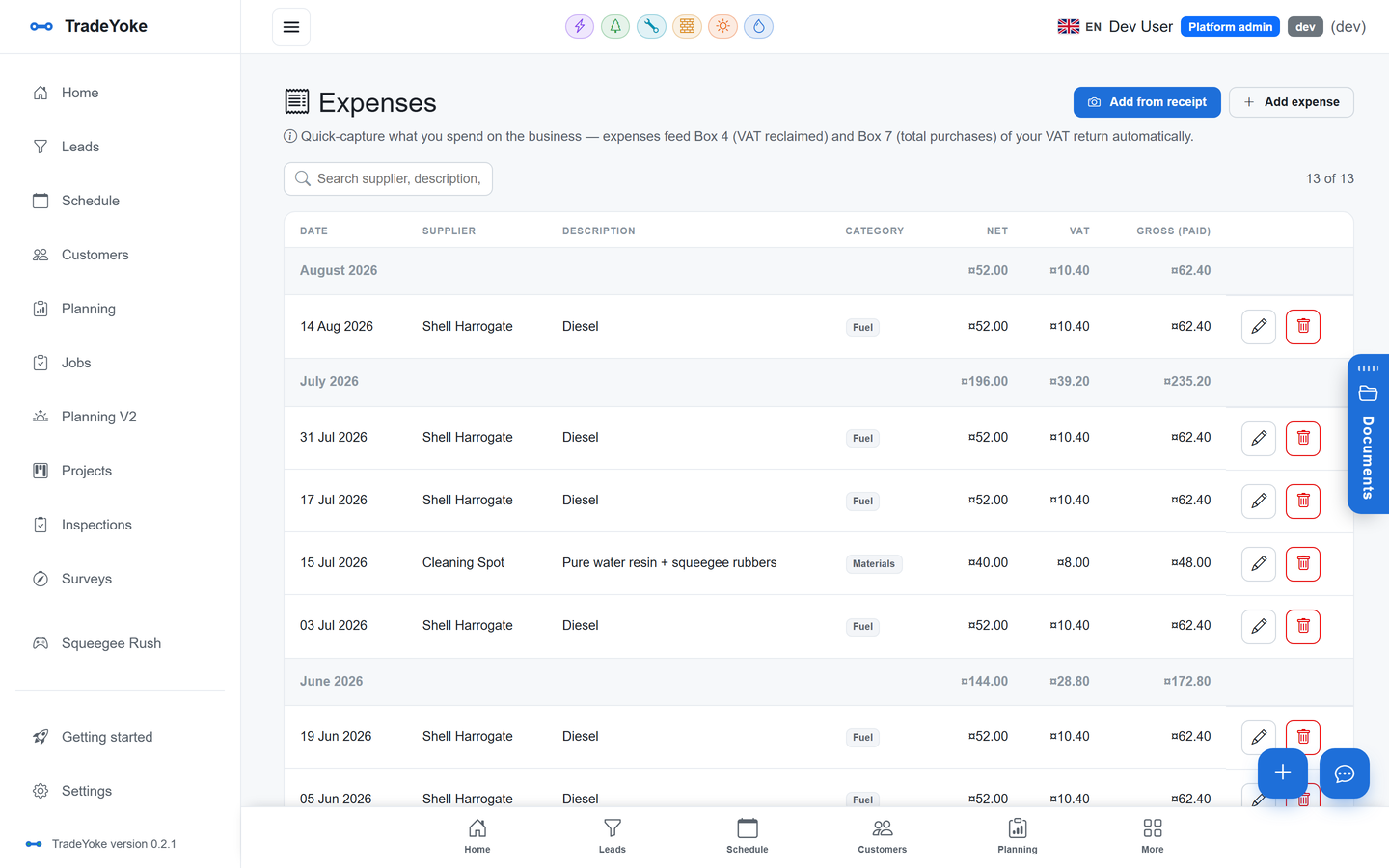
In TradeYoke the Expenses page has a camera button. Point it at the receipt and the supplier, total and VAT amount are read for you and pre-filled. Check them, pick a category, and it is done. The image stays attached to the expense in the document library, so the original is always one tap away.
The reading is not magic and it is not always perfect on a crumpled receipt, which is why you check the total before saving. But it turns a chore into a glance, and a glance happens every time.
Attach it to the job, or to the van
An expense on its own is a cost. An expense attached to a job is a margin. Attach the materials for the fuse board to that job, and the job's record shows what it earned against what it cost. Attach the tyres to the van, and the vehicle record shows what that van costs to keep on the road. Over a year, this is the difference between knowing which work pays and guessing.
The suppliers register keeps the names consistent, so the merchant you use three times a week is one supplier in the report, not eleven spellings. For a electrician or plumber buying materials per job, the job attachment is the habit worth building first.
Mileage from the day's stops
Mileage is the expense sole traders most often under-claim, because nobody keeps the log. TradeYoke builds the day's mileage from the stops you actually visited, so the log is a by-product of doing the round rather than a separate job.
If you use HMRC's simplified expenses, the approved rate for a car or van is 45p a mile for the first 10,000 business miles in the tax year and 25p a mile after that. Whether simplified expenses or actual vehicle costs suits you better is an accountant question; either way you need the miles.
The accountant file
At the end of the quarter or the year, the Reports page exports two CSV files: one for income and payments, one for expenses. Between them they are the whole year in two attachments, with each expense line linked to its receipt image. Your accountant gets a file they can work from instead of a bag.
If you sync to Xero, QuickBooks or FreeAgent, invoices and payments arrive there directly. Which package suits a trade business covers the choice. Either way, the expenses side is what feeds boxes 4 and 7 on a VAT return, which MTD for VAT in plain English explains, and it is what a quarterly update will need once MTD for Income Tax reaches you.
What HMRC expects you to keep
You do not send receipts to HMRC with a return, but you must be able to produce them if asked. Digital copies are fine as long as they are legible and complete. Keep the record of what the expense was for, which is why the category and the job attachment matter as much as the image.
None of this is tax advice. What counts as allowable, and whether you claim actual costs or flat rates, is for your accountant. What the routine does is make sure that whatever they decide, the evidence exists.
The receipt routine
- Photograph at the tillSupplier, total and VAT read for you. Check the total.
- Pick the categoryMaterials, fuel, tools, PPE, subcontractor.
- Attach to the job or the vanMaterials to the job; tyres, fuel and servicing to the vehicle.
- Let mileage build from the stopsReview it weekly rather than reconstruct it yearly.
- Export the two CSVsIncome and payments, expenses. Send both to your accountant.
Questions people ask
Does HMRC accept photographed receipts?
Yes. Digital copies are acceptable as long as they are legible and you keep them for the required period: at least five years after the 31 January deadline for the tax year for Self Assessment, and six years for VAT records. Check gov.uk for your own case.
How accurate is the receipt reading?
Good on a clean receipt, less so on a crumpled or faded one. The supplier, total and VAT are pre-filled for you to check before saving, and the original image stays attached to the expense so you can always look at it.
Can I claim mileage as well as fuel?
Not both for the same vehicle. HMRC's simplified expenses use a flat rate per business mile that covers fuel and running costs; the alternative is claiming actual costs. Your accountant will tell you which suits you. Either way you need a mileage record, which TradeYoke builds from the day's stops.
What does the accountant file contain?
Two CSV exports from the Reports page: income and payments, and expenses. Each expense line links to its receipt image and its job or vehicle, so your accountant gets the evidence with the numbers.
Expenses, mileage and the accountant CSVs are in Essentials; see the pricing page. The platform overview shows how expenses connect to jobs, vehicles and reports.
Thirty seconds on the forecourt
Start the free trial and photograph the next receipt before it reaches the glovebox.