Running two trades on one account (and why the diary doesn't care)
Plenty of trade businesses do two things: windows and gutters, gardens and fencing, solar and the electrics. One account, one diary, one customer list, one invoice run.

A surprising number of trade businesses are two businesses. The window cleaner who does gutters and pressure washing. The gardener who fences. The solar installer who is also the electrician. The scaffold firm whose roofing arm keeps the scaffold busy. Most job-management software makes you choose one, or run two accounts and re-type the customer twice.
TradeYoke was built so that compatible trades share one account: one diary, one customer list, one invoice run. This post explains what has to be shared, what stays separate, and why the diary genuinely does not care which trade a job belongs to.
Running two trades in one app: what actually has to be shared
Four things, and they are the four things you would otherwise duplicate. The customer, because Mrs Patel is one person whether you are cleaning her windows or cutting her lawn. The diary, because you have one Tuesday. The money, because she owes you one balance and you want one report of who owes what. And the team, because the same people do both.
Everything else can stay specific to the trade. The window cleaning job knows about frames, conservatory roofs and access. The gardening job knows about the task list and the season. Neither needs to know the other exists, and the shared parts do not need to know either of them in detail.
Why the diary doesn't care
The scheduler in TradeYoke knows only a small projection of any job: when it is, who is doing it, where it is, which trade it belongs to and what state it is in. That is enough to draw a day, a week or a month, colour each entry by trade, drag it to another day, and put it on the route. It deliberately knows nothing about frames or lawns.
Each trade keeps its own rich job record and its own screens for creating and editing it. When you open a job from the diary, the trade's own panel appears; when you look at the week, the diary draws both trades side by side. That is what "the diary doesn't care" means in practice: adding a trade never changes the calendar, so the calendar is the same one you learned on day one. The platform page shows the schedule and Plan my day.
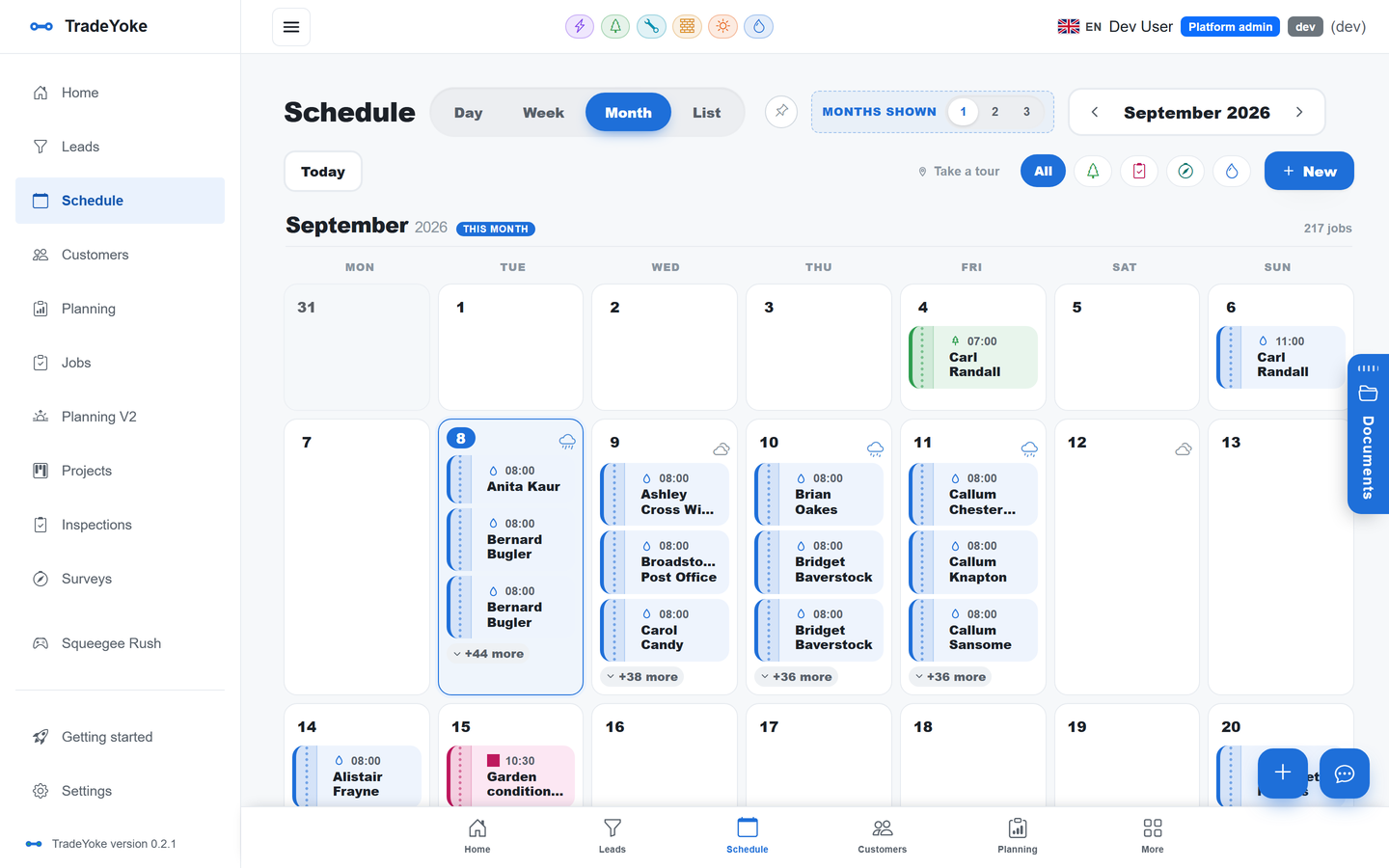
The diary knows when, who, where and which trade. It does not need to know what a conservatory roof is.
TradeYoke
One customer list, two kinds of job
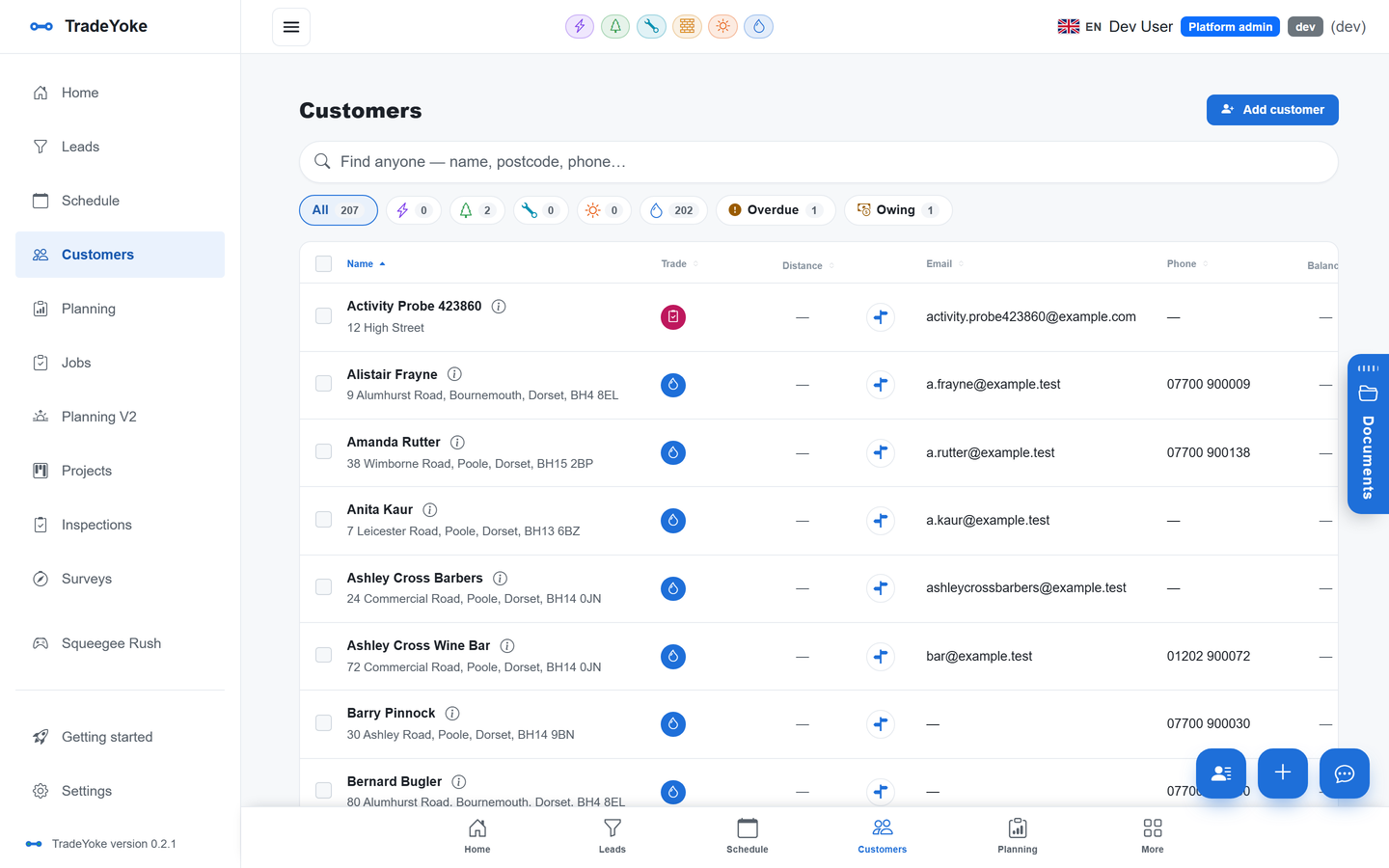
The customer record is generic. It holds the name, the addresses, the notes, the documents, the communications history and the balance. Jobs attached to it are trade-specific. So a customer who has windows cleaned every four weeks and the garden done fortnightly in summer has one record, two recurring series, one balance and one place where both are visible.
That matters most for money. The morning 'who owes me' email lists her once, with everything owed, and the customer portal shows her everything in one place to pay. Reminders and receipts go from one business identity, so she never gets two texts from two names on the same afternoon. A spreadsheet of customers imports once, with duplicate detection, as described in the move-over-in-an-afternoon post.
Projects: when a job needs more than one trade
Some work is not two jobs for one customer but one piece of work with two trades on it. A solar installation with the electrical certification. A roof repair with the scaffold that makes it possible. That is what projects are for: a customer, a site, a status and the trades involved, with the visits from each trade on the diary and the quotes and invoices raised from the project.
Projects came out of the scaffolding pilot, where almost every site carries another trade. The inspection discipline that goes with it is in the seven-day inspections post.
Compatible trades: what works together today
Window cleaning and gardening are live and have shared accounts since the start. Scaffolding, electricians, plumbers and gas, and solar installers are in pilot with real businesses, and the pilots include combinations, because that is how those businesses are shaped. The trades page has a page for each.
Common pairings on one account
| First trade | Second trade | What is shared | Status |
|---|---|---|---|
| Window cleaning | Gardening | Customers, diary, rounds, invoices, owed report | Live |
| Solar installer | Electrician | Customer, project, certificates, handover pack | In pilot |
| Scaffolding | Any site trade | Project, site, visits, documents, team | In pilot |
| Plumber and gas | Electrician | Landlord portfolio, certificate expiries, agent contacts | In pilot |
What stays separate
Each trade has its own settings tab: its prices, its paperwork, its defaults and whether the guided job wizard is on for it. Each trade's certificates and documents are its own. Team members can be marked with the trades they work in, so the window cleaning crew and the gardening crew are distinct on the register even when they overlap on Fridays. Reports show the whole business and the value of each round, and the accountant CSVs cover the business as one; how two trades appear on your tax return is a question for your accountant.
The Squeegee Rush arcade game, for what it is worth, belongs to the window cleaning module and stays there. The gardeners have asked.
What it costs
Plans are per business. Free is £0, Essentials is £19 a month, Premium is £39 a month and Ultimate is £55 a month, and none of them is multiplied by trades or by users. A window cleaning and gardening business pays the same as a window cleaning business. Pilot trades are priced with the pilot businesses while the pilots run. The pricing page has the detail, and the 30-day trial of Essentials lets you run every trade you need.
Adding a second trade to an existing account
- Switch the trade on in settingsIt appears as a tab and in the job wizard's trade picker.
- Set its prices and paperworkIn its own settings tab; the first trade is untouched.
- Mark which team members work in itOn the team register, so the diary and Plan my day assign the right people.
- Book the first job against an existing customerNo new customer record; the job is the new thing.
- Check the owed report the next morningOne list, both trades, one balance per customer.
Questions people ask
Do I pay twice for two trades?
No. Plans are per business. Every plan covers every trade on the account, and users are not charged separately either.
Can I switch a trade off again?
Yes. Trades are switched on and off in settings. Switching one off hides its screens and its entry in the job wizard; the customers and the history stay where they are.
Will my window cleaning customers see that I do gardening?
Only if you tell them. Invoices, texts and emails carry your one business identity. Many businesses use the customer list to offer the second trade to the first trade's customers, which is the cheapest marketing there is.
Can one person be in one trade only?
Yes. The team register records which trades each person works in, and the diary respects it when assigning. A person can be in both.
One account, every trade you do
TradeYoke runs compatible trades on one diary, one customer list and one invoice run, at one price per business. Start a 30-day trial of Essentials with no card.