Customers & CRM
One customer list across every trade
A CRM for trade businesses: one customer list shared by every trade you run, with duplicates flagged and merged, notes and documents attached, every job, quote, invoice and balance in one place, and the customer's location on the map.
30-day free trial · No card required · Web app today, mobile & Windows apps in pilot

- Web Open nowBeta
 Coming soon
 Coming soon
 Coming soon
Included onEvery plan, including Free
Watch how it works: Your customers
One list, one card each: add a customer, link the people around them, message them and keep their paperwork. A short narrated walkthrough, with captions.

You just watched
Your customers in TradeYoke: one list, one card each
Trade CRMs tend to be either a contact list or an accounting ledger. TradeYoke's customer record is both: who they are and how to reach them, what work you have done and have booked, what they owe and how they usually pay, the notes the van needs and the documents you have sent them. Because every trade shares the record, a customer who has both their windows and their garden done is one customer, not two.
What it does
Customers & CRM in TradeYoke
Contacts and customers
A generic contact record beneath every trade's customer, with lead source, how they heard about you and consent.
Duplicate detection and merge
Duplicates are flagged on import and on entry; merge two records and their jobs, invoices and documents follow.
Finance tab
Invoices, payments and the running balance on the customer; owing and overdue at a glance.
Notes and documents
Notes for the office, notes for the van, and every document, certificate and photo filed against them.
Location and distance
Geocoded on entry; the list shows distance from you, and the map shows them among the day's jobs.
Recycle bin
Deleted customers go to a bin and can be restored with everything attached.
The real thing
As it looks today
A real screen from the product, not a mock-up. The same screen is on the phone app.
One list, every trade
Duplicates flagged, addresses geocoded

Job done
The record grows with the job
Photos, notes and documents attach to the customer as the work happens.
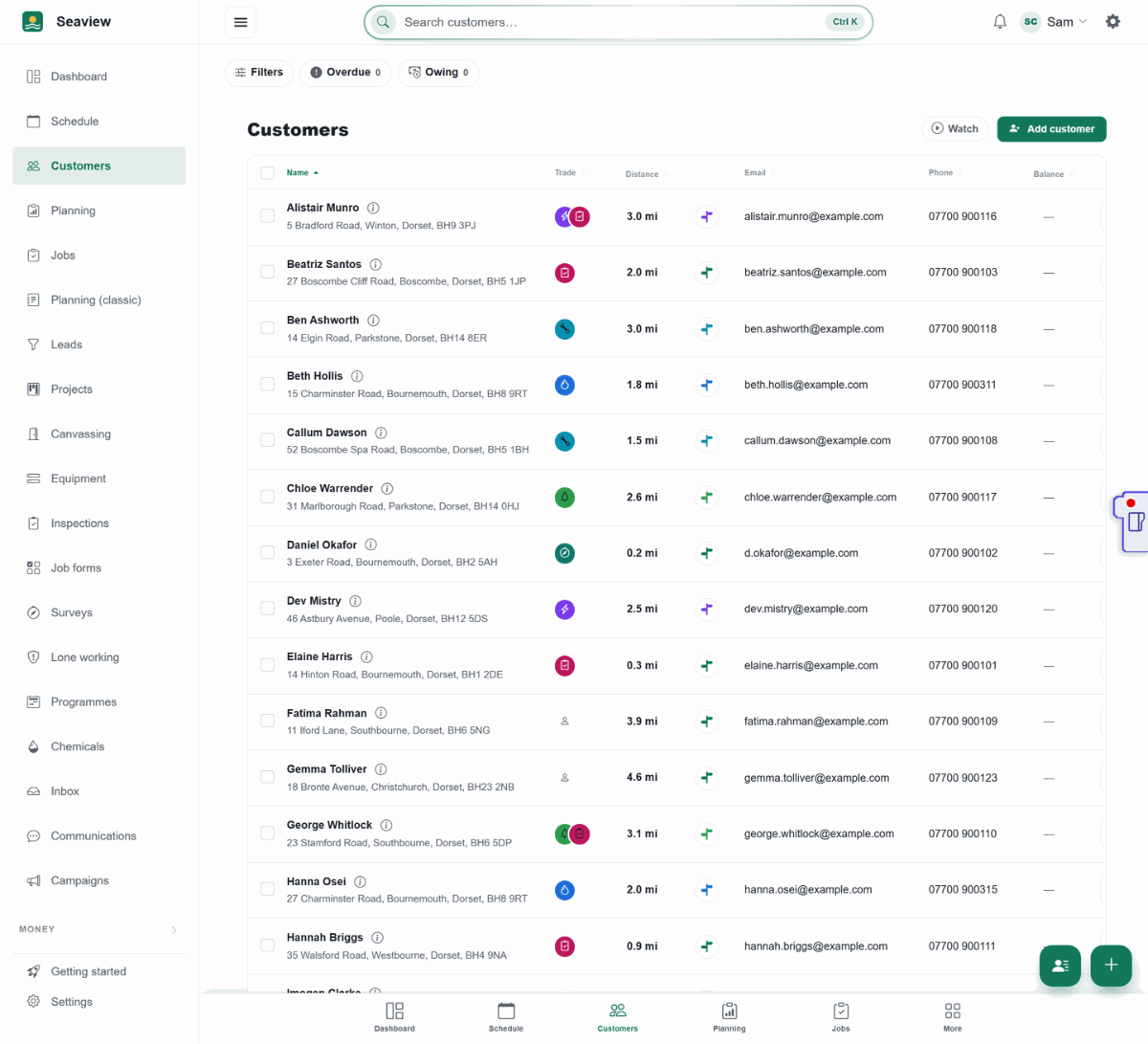
Every customer, one record 
Before heading off
Nothing typed twice
Import a spreadsheet once; TradeYoke flags the duplicates for you.
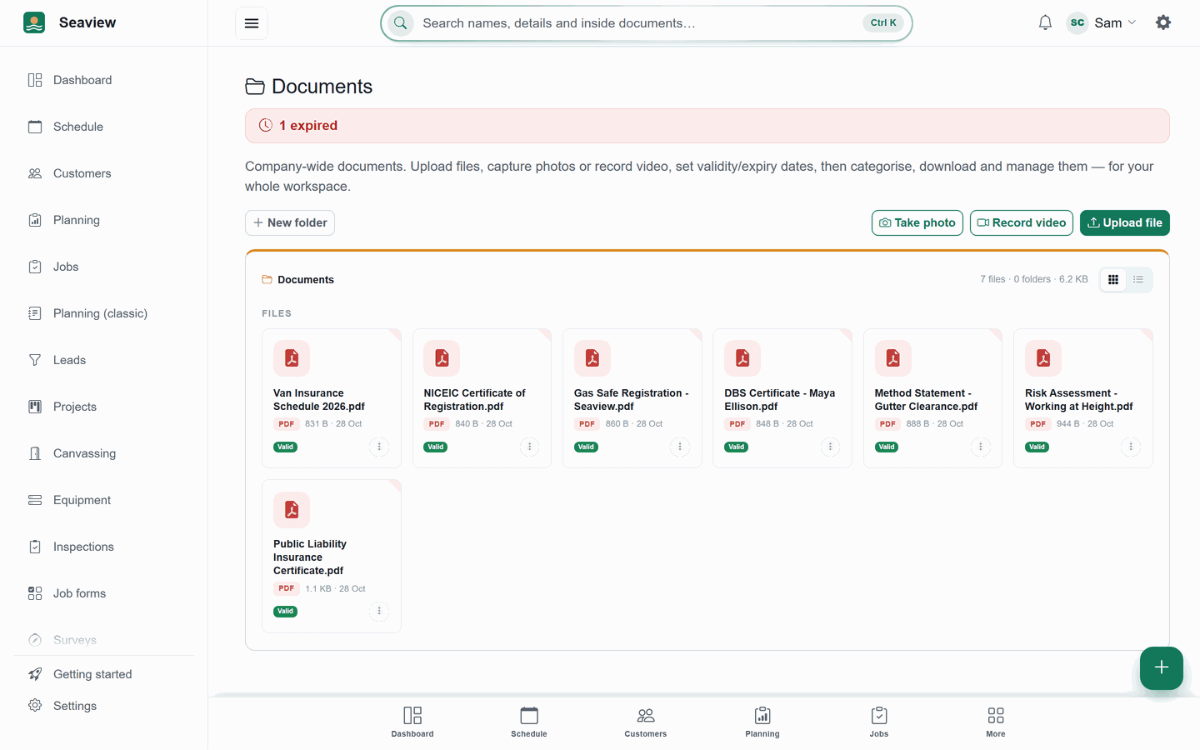
Photos and paperwork, filed together


More of it, as it looks today


The details
Also worth knowing
- Import from a spreadsheetCSV import with a template, dry run, geocoding and duplicate checks.
- Per-trade settings on the customerEach trade adds its own panel: window cleaning frequency and price, gardening schedule, gas appliances.
- Communications historyEvery email and text sent to the customer, and their replies, in one thread on the record.
- Customer portal linkIssue a link where they see what they owe and pay; revoke it any time.
- Balances that don't hold the list upThe customer list appears straight away. While the amounts owed are still loading, the Balance column and the Overdue and Owing buttons show grey placeholders instead of leaving gaps, so a big list never looks finished before it is.
- Details refresh as soon as you saveRename a customer in their open record and the heading and the customer list update immediately, not after you close the panel.
- Message from the customer's recordThe text button on a customer opens the message wizard with that person already chosen. Pick Booking confirmation or Visit reminder and it uses their next booked visit for the day and reference.
- A customer's record, in your pocketSearch from the top bar, open a customer and see their details, finance, jobs and notes in tabs you swipe along, with their address on a map, a Directions button and Street view underneath. The phone layout puts the person and the way to their door first.
- Add a customer from your phoneThe new customer form uses the whole phone screen. If the address you type is not in the list, choose Enter manually and type it yourself. The map is bigger, with controls that no longer overlap, and help bubbles always stay on the screen.
- Add a customer in one formTitle, Person or Business, a second phone and email, and the description are all on the main form; preferences and marketing choices sit in a section you can open. Leave a new customer half-filled and TradeYoke saves it once it has a first name and an address, or asks whether to save, discard or keep editing. Cancelling an edit puts the customer back as it was.
- Addresses that follow your countrySet your business country under Settings, General, Regional and addresses ask for the right thing: County in the UK and Ireland, State in the USA, Bundesland in Germany, Region elsewhere. County is a list you can filter as you type, with every UK county, and a postcode lookup fills it in for you.
Questions
Asked about customers & crm
Can two trades share one customer?
Yes. That is the point of the shared record: one customer, one balance, one history, however many trades you do for them.
What happens to duplicates?
They are flagged when you import or type a match, and you can merge them; nothing attached is lost.
Can I export my customers?
Yes, to CSV at any time.
Can I see a customer's address and get directions on my phone?
Yes. Open the customer in TradeYoke on your phone: their address is pinned on a map preview, with a Directions button that opens directions to the door and a Street view button to see the house first. Tap the map to open it full screen.
Can I add a customer with an address that isn't found?
Yes. Under the address box, Enter manually keeps what you typed and lets you fill in the address yourself. You can switch back to searching for the address at any time.
Related: Customer portal · Email & SMS messaging · Who owes me
Try customers & crm on your own work
30 days of Essentials free, no card. Import your customers and see it against a real week.